OpenCV 기본 세팅 Setting
OpenCV를 Visual Studio에서 사용하기 위한 기본 Setting 과정
※opencv 설치 경로 : C:\
※opencv 버전 : opencv-4.8.0-windows
- 아래와 같이 새 프로젝트를 생성한다.
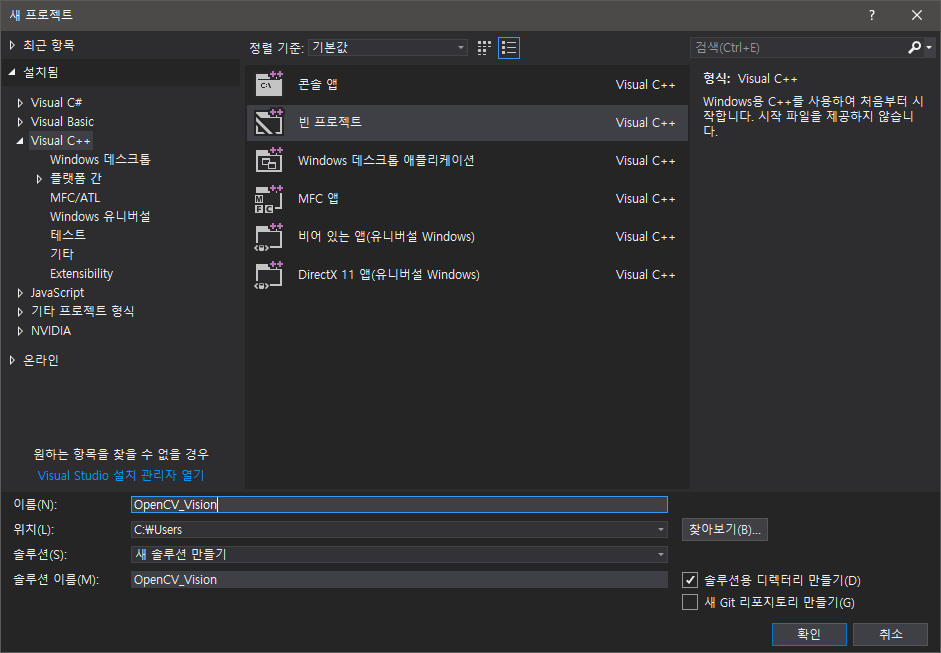
- 아래와 같이 소스파일 폴더 아래 Main.cpp 파일을 하나 생성한다.

- OpenCV_Vision 프로젝트의 속성으로 들어간 후 구성(C): 모든구성, 플랫폼(P) : x64 로 설정
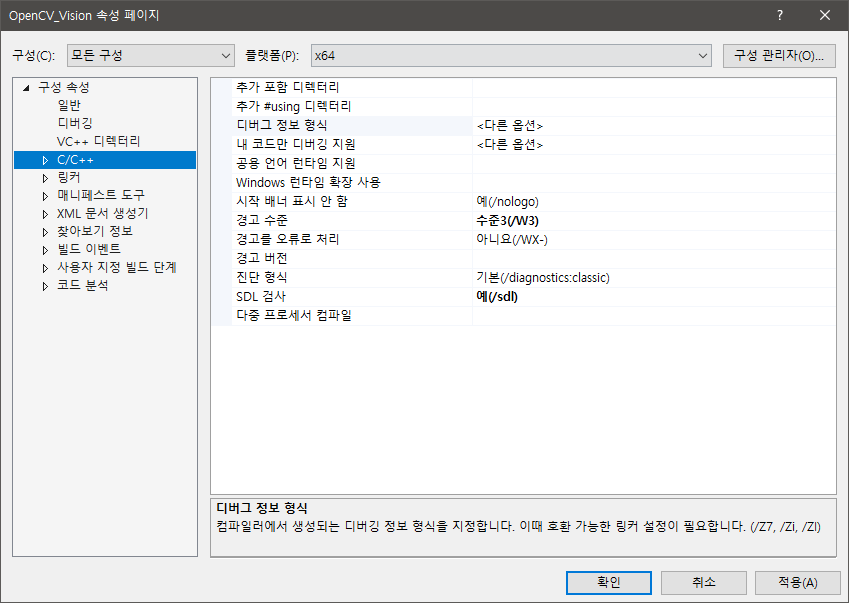
- opencv가 설치된 경로를 추가한다. 공통설정
 4-3. 디버깅항목에 환경에 DLL경로를 입력 PATH = C:\opencv\build\x64\vc16\bin;%PATH%4-4. 구성-Debug 추가종속성에 opencv_world480d.lib 입력
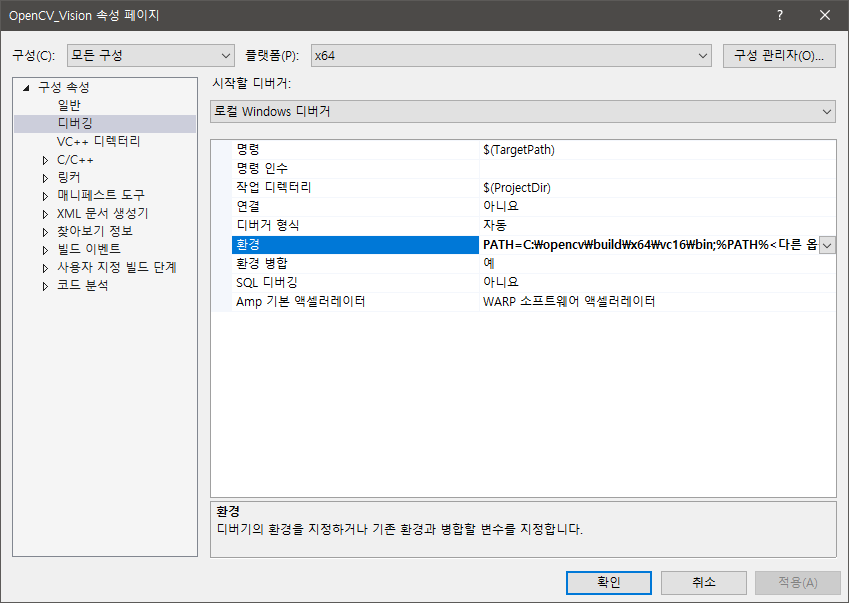

- 4-2. 링커의 추가 라이브러리 디렉터리에 C:\OpenCV\build\x64\vc16\lib 입력 : 링커를 포함시킴
- 4-1. C/C++의 추가 포함 디렉터리에 C:\opencv\build\include 입력 : 헤더파일을 포함하는 것
- OpenCV_Vision 프로젝트의 속성으로 들어간 후 구성(C): Debug, 플랫폼(P) : x64 로 설정
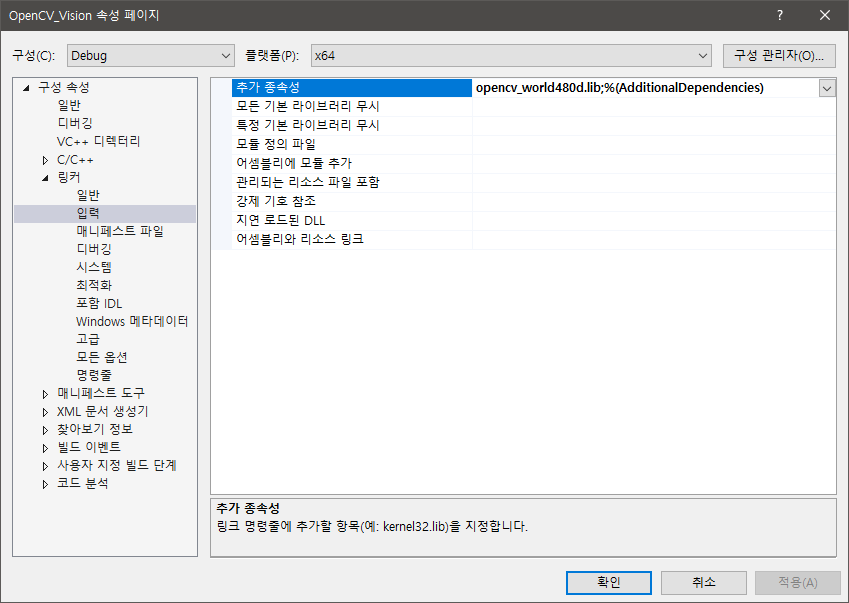
- 5-1. 추가 종속성 항목에 opencv_world480d.lib 입력
- OpenCV_Vision 프로젝트의 속성으로 들어간 후 구성(C): Release, 플랫폼(P) : x64 로 설정
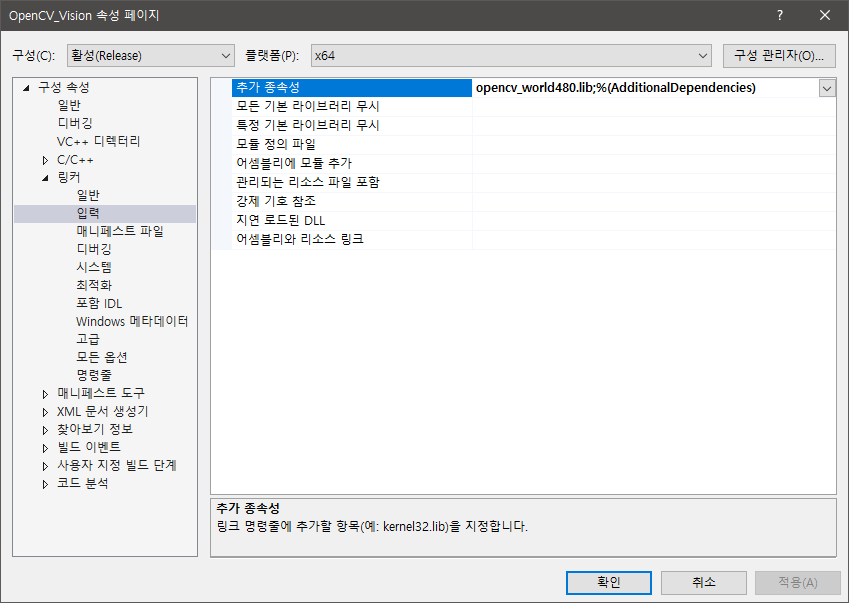
- 6-1. 추가 종속성 항목에 opencv_world480.lib 입력
- 정상적으로 세팅이 되었는지 샘플코드 입력 후 빌드/실행하여 확인한다.
 7-3. 샘플코드
 /** @file videocapture_basic.cpp @brief A very basic sample for using VideoCapture and VideoWriter @author PkLab.net @date Aug 24, 2016 */ #include <opencv2/core.hpp> #include <opencv2/videoio.hpp> #include <opencv2/highgui.hpp> #include <iostream> #include <stdio.h> using namespace cv; using namespace std; int main(int, char**) { Mat frame; //--- INITIALIZE VIDEOCAPTURE VideoCapture cap; // open the default camera using default API // cap.open(0); // OR advance usage: select any API backend int deviceID = 0; // 0 = open default camera int apiID = cv::CAP_ANY; // 0 = autodetect default API // open selected camera using selected API cap.open(deviceID, apiID); // check if we succeeded if (!cap.isOpened()) { cerr << "ERROR! Unable to open camera\n"; return -1; } //--- GRAB AND WRITE LOOP cout << "Start grabbing" << endl << "Press any key to terminate" << endl; for (;;) { // wait for a new frame from camera and store it into 'frame' cap.read(frame); // check if we succeeded if (frame.empty()) { cerr << "ERROR! blank frame grabbed\n"; break; } // show live and wait for a key with timeout long enough to show images imshow("Live", frame); if (waitKey(5) >= 0) break; } // the camera will be deinitialized automatically in VideoCapture destructor return 0; }
- 7-2. 활성상태를 Release, x64로 설정 후 빌드
- 7-1. 활성상태를 Debug, x64로 설정 후 빌드
'OpenCV' 카테고리의 다른 글
| OpenCV 픽셀 접근 속도 테스트 (0) | 2024.05.11 |
|---|